Best Office Chairs Under $300 (2026): 4 Picks With Real Lumbar
Affiliate Disclosure: This article contains affiliate links. If you purchase through these links, we may earn a commission at no additional cost to you. This helps us maintain our free job board and create helpful content. Read our full disclosure policy.
Short answer: The Sharper Image chair I use every day (about $299) is the one I'd buy again: soft, well made and with real lumbar support. If $200 is your limit, the SIHOO M57 has the most adjustable lumbar and armrests near $200, the Marsail fits small desks, and the Staples Hyken is the one to try in a store first. Or get a premium chair for about $200 by buying a used Steelcase Leap.
My honest take: with office chairs, you get what you pay for. You'll sit in this chair for hours every day, for work, browsing and gaming, so if you can stretch to about $300, do it. If $200 is your limit, the chairs below still get the one thing right that matters most: lumbar support. Dealing with back pain, or looking at premium chairs like the Herman Miller Aeron? See our guide to the best office chair for back pain.
Why Lumbar Support Is the One Thing Not to Skip
I'm 25, and I still had back pain. I was working from a $50 chair from Staples with no back support at all. When I switched to a similar chair with better materials and adjustable lumbar support, the back pain went away, and it never came back.
That's the lesson I'd pass on to anyone buying a chair: lumbar support is a must, and it's a big plus if you can adjust it. With the right support, your back will thank you, whether you're 25 like me or 45 years old. Get up and stretch your legs after long sessions; your back will be fine.
What's worth paying for
- Lumbar support, ideally adjustable, so it sits right in the curve of your lower back
- Premium materials that stay comfortable and hold their shape
- A soft, supportive seat you can sit on for a full workday
What isn't
- Heated and massage features. My own chair has both, and I never use them. A chair rolls around, so a power cord attached to it is more annoying than useful
- Paying extra for the basics. Height adjustment, a swivel base and a mesh or padded back come standard on almost every chair
Quick Comparison: The Best Chairs Under $300
| Chair | Best For | Standout Feature |
|---|---|---|
| Sharper Image | Worth stretching for (about $299) | Soft premium padding and lumbar support |
| SIHOO M57 | Best under $200 | Lumbar that moves up, down, in and out |
| Marsail | Small desks | Flip-up armrests and a padded seat |
| Staples Hyken | Trying before you buy | In stores, 5-year warranty |
1. Sharper Image Ergonomic Chair - The One I Use (Worth Stretching For)
Price: about $299
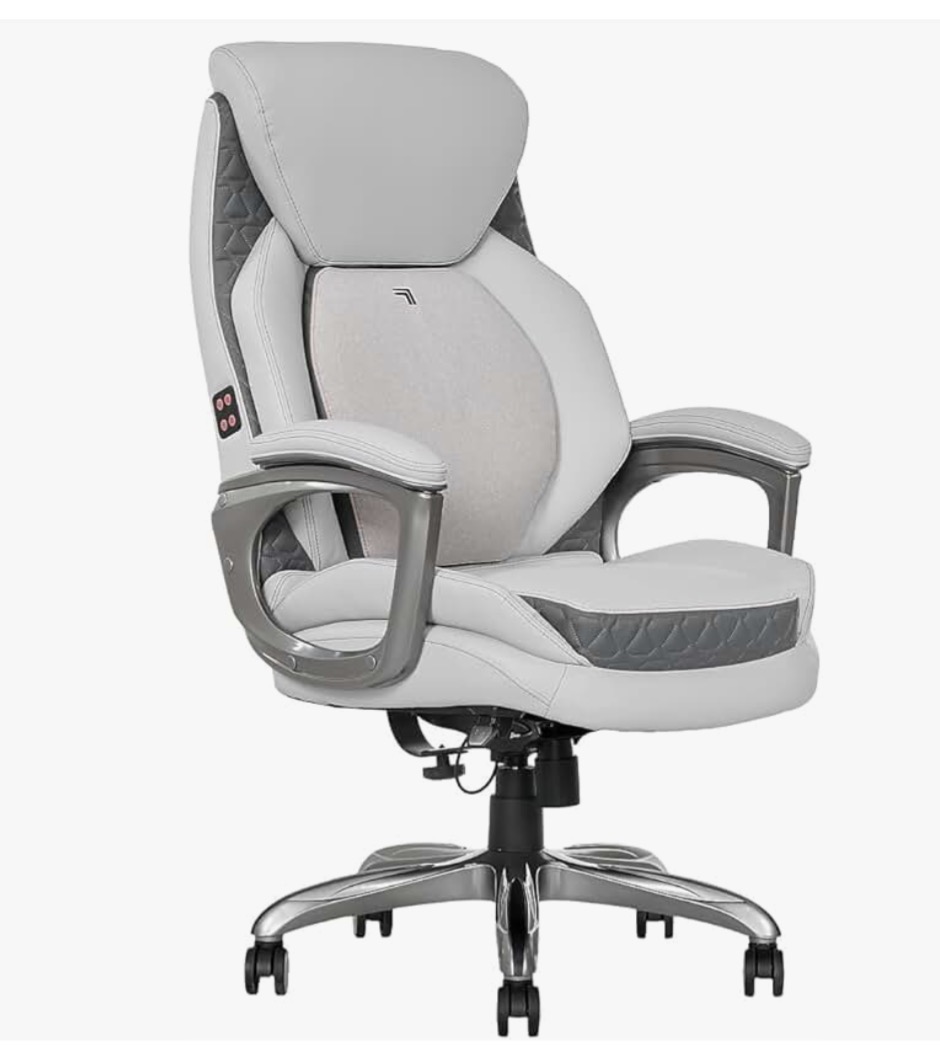
Why it's my top pick: This is the exact chair I sit in every day, for work, browsing and gaming, and I love it. It's what a chair at this price should be: soft, thick padding that stays comfortable all day, premium-feeling materials and lumbar support right where your lower back needs it. It costs more than the other picks, and it's worth it.
Key features:
- Soft, thick padding on the seat and the high back
- Built-in lumbar support
- Padded armrests and a sturdy metal base
- Heat and massage built in (more on that below)
Who it's for: Anyone who spends 8+ hours a day in their chair and can stretch past $200.
Downsides: It's about $100 more than the budget picks. It comes with heat and massage, which I don't use, so you're paying a little for features you may never switch on. Leather-style upholstery also feels warmer than mesh in a hot room.
Sharper Image
Sharper Image Ergonomic Executive Chair
- ✓Soft, thick padding with a high back
- ✓Built-in lumbar support
- ✓Padded armrests and a sturdy metal base
- ✓The chair I use every day
As an Amazon Associate we earn from qualifying purchases.
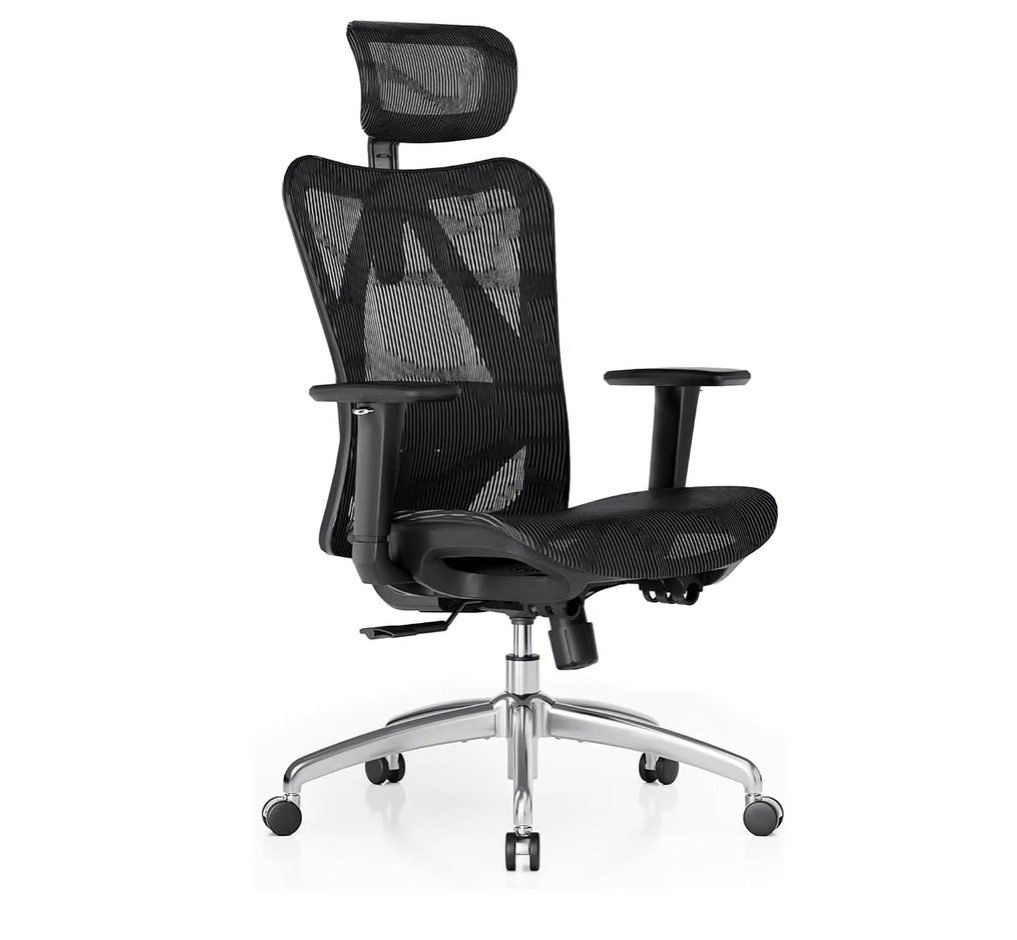
2. SIHOO M57 - Best Under $200
If $200 is your limit, the M57 is the most adjustable chair you'll find near that price. Its lumbar support moves up and down and in and out, so you can put it exactly where your back needs it, and the armrests adjust three ways. If you've ever had sore shoulders from armrests that sit too high or too far back, this is the one.
Key features:
- Lumbar support that adjusts up and down and in and out
- 3D armrests that adjust in height, depth and angle
- Adjustable headrest
- Mesh back and seat, reclines to about 120°
Who it's for: People who type all day, anyone with lower back or shoulder pain and anyone who wants to fine-tune their setup on a budget.
Downsides: The mesh seat is firmer than a padded one, so it isn't as soft as the Sharper Image. The price moves around $200, so wait for a sale if it's above that.
SIHOO
SIHOO M57 Ergonomic Office Chair
- ✓Lumbar moves up and down and in and out
- ✓3D armrests: height, depth and angle
- ✓Adjustable headrest, reclines to about 120°
- ✓Most adjustable chair near $200
As an Amazon Associate we earn from qualifying purchases.
3. Marsail Ergonomic Chair - Best for Small Desks
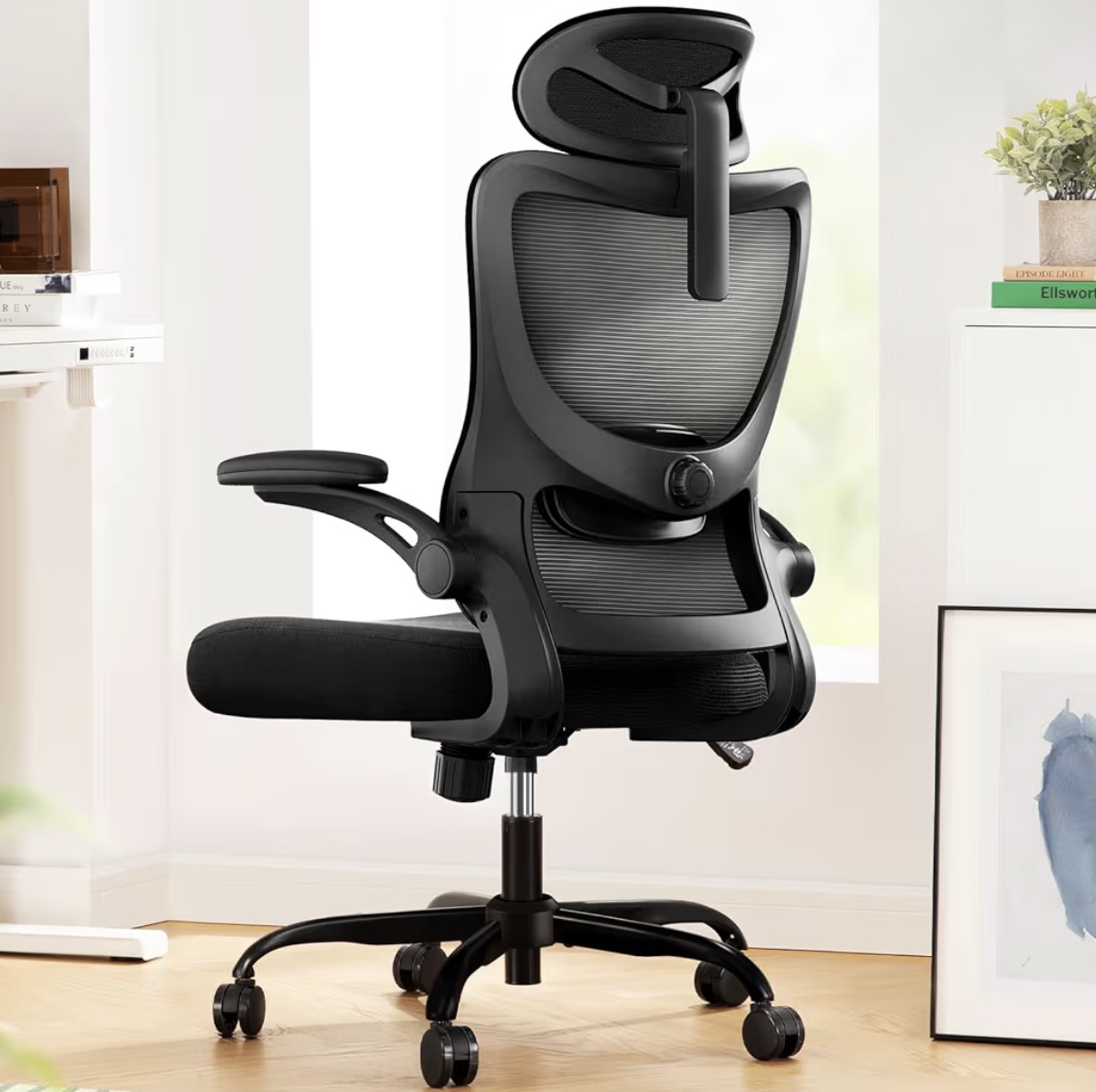
Not every home office has room for a big executive chair. The Marsail's armrests flip up out of the way, so the chair slides right up to a small desk or a kitchen-table setup, and you get adjustable lumbar support and a padded seat for less.
Key features:
- Flip-up armrests
- Adjustable lumbar support and headrest
- Padded fabric seat with a mesh back
- Reclines between about 90° and 120°
Who it's for: Small rooms, shared spaces and anyone who wants a padded seat on a tight budget.
Downsides: Marsail sells several similar models with different specs, so check the weight rating and seat height range on the listing before you buy.
Marsail
Marsail Ergonomic Office Chair
- ✓Flip-up armrests that clear a small desk
- ✓Adjustable lumbar and headrest
- ✓Padded fabric seat with a mesh back
- ✓A lower-cost way to get lumbar support
As an Amazon Associate we earn from qualifying purchases.
4. Staples Hyken - Best If You Want to Try It First
The Hyken is the chair to look at if you'd rather sit in it before you buy. It's on display in many Staples stores, it's rated for 275 lbs and it comes with a 5-year warranty. It regularly goes on sale for about $150 to $170.
Who it's for: Anyone who wants to try a chair in person, or who wants a longer warranty than most budget chairs.
Downsides: It has fewer adjustments than the SIHOO M57, and it's sold by Staples rather than Amazon.
See the Staples Hyken at Staples →
The Used Option: A Steelcase Leap for About $200
Here's the advice most chair guides leave out: offices replace chairs all the time, and a used Steelcase Leap or Herman Miller chair often sells for about $175 to $300 through office furniture liquidators and local listings. These chairs were built for 10+ years of all-day office use, so a used one gets you premium materials and adjustable lumbar support at a budget price.
Before you buy used:
- Sit in it and try every adjustment: height, recline, lumbar and arms
- Check that it holds its height and doesn't slowly sink (a worn gas cylinder is a cheap fix, but factor it in)
- Look for torn armrest pads and a frayed or stretched seat
- Prefer a refurbisher or liquidator that offers returns or a short warranty
How to Choose an Office Chair on a Budget
1. Make lumbar support the first thing you check
The lumbar support should sit in the curve of your lower back, around belt height. If you can adjust it, even better: it matters more the taller or shorter you are than average.
2. Match the seat height to your desk
With your feet flat on the floor, your elbows should sit at about desk height. Most desks are about 29" to 30" tall, which suits most chairs. If your feet don't reach the floor at the right height, add a footrest.
3. Check that the armrests fit under your desk
Armrests that don't move can bump the desk edge and keep you too far from your keyboard. Adjustable or flip-up arms solve this.
4. Choose a weight rating with headroom
Pick a chair rated comfortably above your weight. The base, cylinder and foam last longer that way.
5. Check the return policy
Chairs are big and awkward to send back. Buy from a seller with an easy return window, keep the box until you're sure, and give a new chair a week before you decide.
Set Up Your Chair in 5 Minutes
- Seat height: feet flat, knees at about hip height
- Lumbar: move it into the curve of your lower back
- Armrests: just below desk height, so your shoulders relax
- Recline: unlock it slightly so you can lean back on calls
- Screen: top of the monitor at or just below eye level, about an arm's length away
With good lumbar support, your back is taken care of. Your legs aren't, so get up and stretch them after long sessions.
Pairing your chair with a standing desk? See our standing desk guide for desk height and monitor tips, or the complete home office setup checklist.
How I Picked These Chairs
I started with the chair I actually use every day. For the budget picks, I looked at the chairs that come up again and again in recommendations and owner reviews, then compared them on what matters for a full remote workday: lumbar support first, then comfort, armrest adjustment, weight rating, warranty and how easy they are to return. I left out chairs with a lot of reports of seats or cylinders failing in the first year, and "gaming" chairs whose padding looks comfortable but offers little real support.
The Bottom Line
If you can stretch to about $300, get the Sharper Image: it's the chair I use and love, and you'll feel the difference every day. If $200 is your limit, the SIHOO M57 gives you the most adjustable lumbar support and armrests, and the Marsail suits a small desk. Or get premium materials at a budget price with a used Steelcase Leap. Whatever you pick, don't buy a chair without lumbar support.
Still looking for the remote job to go with your new chair? Browse entry level remote jobs, customer service jobs or every new remote job on No Commute Jobs.
Frequently Asked Questions
How much should I spend on an office chair?
With office chairs, you get what you pay for. Plan on about $300 or more for a chair that's soft, well made and has real lumbar support; that's what I paid for the chair I use every day. Under $200 you can still get adjustable lumbar support, but expect firmer seats, cheaper materials and a chair that won't last as long.
What is the most important feature on an office chair?
Lumbar support, ideally adjustable. Seat height, a padded seat and recline come standard on almost every chair. Support for the curve of your lower back is what separates a chair you can sit in for 8 hours from one that gives you back pain.
Are heated or massage office chairs worth it?
Not for those features. My own chair has heat and massage built in, and I never use them. Chairs roll around, so a power cord attached to one gets in the way more than it helps. Buy a chair for its lumbar support and padding, and treat heat or massage as a bonus you may never switch on.
Is a used Herman Miller or Steelcase better than a new budget chair?
Often, yes. Used Steelcase Leap and Herman Miller chairs from office liquidators and local listings regularly sell for about $175 to $300, and they were built to last 10+ years of office use. The trade-offs are no warranty (unless you buy from a refurbisher), no returns from private sellers and having to inspect the chair in person.
How much weight can a budget office chair hold?
Most chairs in this price range are rated for about 250 to 300 lbs, and the rating can differ between versions of the same model. Check the exact listing before you buy, and if you're near the limit, choose a chair rated well above your weight: the base, gas cylinder and seat foam all last longer that way.